
JB FAQ - free jQuery Joomla faq module
 JB FAQ is a free Joomla FAQ module that gives you a simple way to display some of your most common articles on your website. It takes your Joomla content and puts the articles into a clean module that allows you to select an article and expand to view the text. It helps to reduce the amount of space wasted, but also helps highlight the most common articles. It doesn't have to be used for FAQ files, it could be used for any Joomla content!

The accordion function in the Zentools module has been designed to replace most of the functionality found in the JB Faq module.
The Zentools module is a swiss army knife approach to Joomla modules. You can create an awesome array of flexible layouts using the Zentools module.
Find out more nowExamples
Close All | Open AllJB Maps2
Maps2 is a dynamic and intuitive Joomla module for creating google maps. Maps2 features the ability to apply styles, presets, layers and multiple markers via a dynamic and intelligent admin.
Download
JB Skillset
Mod Skillset features three different layouts that help portray your skills / character and activity. As the user scrolls down the module animates the progress bar, counts up to the desired number or encircles the nominated value.
Download
JFlicker
JFlickr delivers a Flickr gallery onto your website. The module is based on the script by Project Atomic and uses JQuery to do all of the hard lifting. You can set the gallery to display images by photoset, user, group or by free text. You assign the number of images to display, the size of the thumbnail and the size of the image that appears once clicked.
Download
JBType
JB Type is a Joomla style and typography plugin for your content. By using some simple Joomla syntax you can create some awesome typography for your site without knowing any html at all. The plugin simply renders predefined style sin your content and now it comes with a JCE plugin that allows you to render the JB Type styles in the editor window as well.
Download
JB Fitvids
JB Fitvids is a simple Joomla plugin that implements Chris Coyler's and Paravel's responsive video solution..
Download
Zentools
The Zentools module is a flexible / responsive image and content gallery module for Joomla. It uses a drag and drop interface to control which elements appear in the module - making building content galleries and grids for Joomla a breeze.
Download
Joomla 3+ Template
A sophisticated super flexible one page menu design combined with polished Joomla article / component styling, two new extensions, lots of different layouts and ideal for anybody looking to celebrate that special event… More
DownloadLive Preview {zengallery}feature-wedding{/zengallery}Joomla 3+ Template
The Italian theme comes to demonstrate the richness and sophistication of Italian gastronomy. All this together with the great Grid Framework solution, enabling numerous forms of customization. More
Download Live Preview {zengallery}feature-italian{/zengallery}Joomla 3+ Template
The Aussie theme comes to highlight the beauties of Australia and Sydney. With a modern design associated with the incredible Grid Framework, it offers several customization possibilities. More
Download Live Preview {zengallery}feature-aussie{/zengallery}October 2016 - Joomla 3+ Template
Utafiti is a clean and elegant design aimed at medical professionals or just those looking for an ultra polished and modern website. It’s built on the Zen Grid Framework v5 which ensures super fast page speed together with huge flexibility and functionality.
DownloadLive Preview {zengallery}feature-utafiti{/zengallery}
Dependancies
Joomla 1.5
features
- Create an FAQ with unlimited number of questions and answers from your Joomla content. You can control which section or category the FAQ comes from and how many items are rendered.
- Open all questions or close all questions button at the top and bottom.
- Open/Close all button appears at the bottom of the FAQ list if Open All button at the top is activated for easier navigation.
- Open/Close All buttons may bepublished or unpublished.
- Active/Inactive state for greater accessibility and functionality.
- Ability to add read more link which when clicked takes the user to the full content item.
- Order questions by created date, modified date, title descending, title ascending, most popular or primary ordering.
instructions
First make sure you install the module using the Joomla Installer in the administration, and then that you've published the module into the position you desire. Then you will be ready to change and configure the settings.
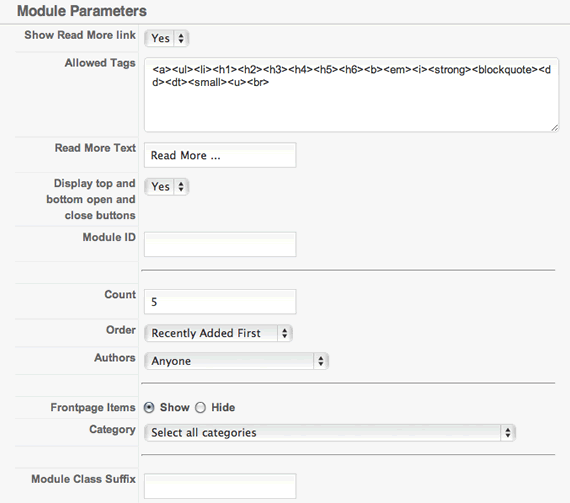
Go into the Joomla Administrator, and find the Module Manager. Here you will see a list of all modules, and go through until you see the JFlickr module. Click on the title and you will see the parameters that you can adjust for the module. When you need more information about a setting, roll over the text to the left and a tooltip will appear. Make sure to hit save when you are done.
Module Parameters
 {/jb_one} {jb_two}
Styling
The FAQ is actually incredibly easy to style.
- The images used to show the active/inactive state of the module can be found in the modules/mod_jbFAQ/images directory and are called by the css file.
- The open and closed state can be controlled by applying CSS attributes to the .open and .closed css rules. This can be done in the css file in the module directory oi styles can be added directly to your template_css.css file.
- The question link can be styled by adding attributes to the a.toggler class.
- The module itself can be styled using a module class suffix.
- The question is controlled by the class 'togglerdiv' and the answer is controlled by the use of the 'answer' class.
- The read more link uses the same styling as the read more link in your template.
Troubleshooting
I installed the module, but cannot see it?
When you install the module, it is setup in the module position 'left' and also disabled. Check that you have moved it to the appropriate module position, and that it is enabled.
Do I need jQuery?
Yes, the module requires it. If you are already loading the JB Library, make sure to disable the loading of jQuery in this module's settings.
Images are not loading, why?
This is possible for a few reasons. If jQuery is already included on your site by the template or another extension, then make sure to disable it in in JB FAQ. Also if there is an incorrect user or photoset id, then it may not display anything.